


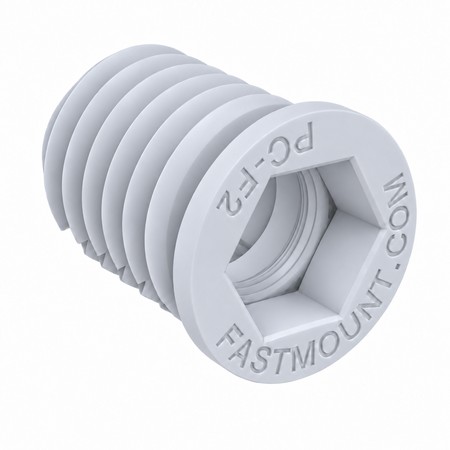


Fastmount PC-F2A Adjustable Self-Tapping Female Clip, 10 mm Depth Adjustment - Standard Range
Fastmount PC-F2A: adjustable self-tapping female clip of the Standard Range, new for 2026. An extended version of the PC-F1A with a longer threaded body that gives up to 10 mm of adjustment perpendicular to the substrate: thread each clip in or out to bring all mounting points onto the same plane and compensate for uneven battens without shims. Self-taps into timber, plywood, composite or MDF (16.8 mm hole) with the CT-03 tool or a Torx T45 bit. Works with every Standard Range male clip. Panel gap 4 to 14 mm. White acetal.

(edit with the Customer Reassurance module)

(edit with the Customer Reassurance module)

(edit with the Customer Reassurance module)
The PC-F2A is Fastmount's new adjustable self-tapping female clip in the Standard Range. Like every female clip it goes into the substrate (batten, bulkhead, frame or board); the male clip goes on the back of the panel. What sets it apart from the PC-F1A is its longer threaded body (24.7 mm of thread instead of about 14 mm), which lets you thread it in or out by up to 10 mm after installation to bring all the clips onto one plane.
What the 10 mm adjustment is for
Real walls and ceilings never have perfectly aligned battens. With fixed females you shim; with the PC-F2A the installer turns each clip with the CT-03 tool or a Torx T45 bit until the panel sits flat, with no shims or rework. It can also be adjusted after the panel is hung: remove the panel, correct the clip that stands proud or sits low, refit.
- Up to 10 mm of travel perpendicular to the substrate.
- Fewer shims and less time aligning panels.
- Non-sequential removability: panels come off and go back in any order, without tools.
- No top gap required: the top panel can be removed without leaving a gap above it.
Technical data
| Type | Adjustable self-tapping female clip, Standard Range |
| Material | Acetal (POM) |
| Adjustment | Up to 10 mm in/out (perpendicular to the substrate) |
| Thread depth / overall depth | 24.7 mm / 26.7 mm |
| Overall diameter | 20 mm |
| Installation hole | 16.8 mm (CT-07 or CT-13A drill; not needed where an accurate 16.8 mm hole is CNC machined) |
| Substrates | Timber battens, plywood, composite or MDF. Pre-tap dense substrates with the CT-15 thread tap |
| Panel gap | 4 to 14 mm with Standard Range male clips |
| Tool | CT-03 (Fastmount toolkit socket bit) or Torx T45, battery drill with clutch |
| Testing | 500 cycles while maintaining the minimum pull-out load; independent test reports on request |
Compatible male clips and loads
The PC-F2A accepts all Standard Range male clips. Pull-out load is set by the male clip; figures are per clip pair, not per panel:
| Male clip | Fixing to panel | Min. pull-out | Min. shear |
|---|---|---|---|
| PC-M1B | Self-tapping | 5 kg | 70 kg |
| PC-M2H | Self-tapping, heavy duty | 10 kg | 55 kg |
| PC-VM1 | Vario self-tapping | 5 kg | 95 kg |
| PC-VMX | Vario self-tapping, extra heavy duty | 15 kg | 130 kg |
| PC-SM2 | Glued (epoxy or polyurethane) | 5 kg | 35 kg |
| PC-SM2H | Glued, heavy duty | 10 kg | 60 kg |
| PC-SVMX | Screw-fixed surface mount | 15 kg | 105 kg |
Fastmount's guideline: a 2400 x 1200 mm wall panel takes 26 clip pairs and must not exceed 40 kg in total; a ceiling panel takes 36 pairs, 30 kg maximum, and only with the PC-M1B or PC-M2H males. Corner clips sit 75-100 mm in from the side edges and 25 mm from the top and bottom edges; maximum spacing 450 mm vertically and 300 mm horizontally (300 mm on ceilings).
Installation
- Drill through panel and frame together with the 10 mm CT-01 drill (CT-08 kit).
- Open the frame hole to 16.8 mm with the CT-07 drill (or CT-13A in fibreglass, carbon or Kevlar).
- Screw the PC-F2A in with the CT-03 tool or a Torx T45 bit in a battery drill with the clutch set. Pre-tap dense plywood or MDF with the CT-15.
- Mark the male positions on the panel with the CP-01ST centre points and fit the chosen male clip.
- Offer up the panel and use the 10 mm stroke of each PC-F2A to bring it flat.
To remove panels: CT-05 (minimum 3 mm gap) and CT-05H with hook (minimum 1 mm gap).
FAQ
How is it different from the PC-F1A?
Same self-tapping female, longer thread: the PC-F1A sits flush and does not move; the PC-F2A can be wound out by up to 10 mm to level. Same 16.8 mm hole, same tools, same male clips.
And compared with the PC-AF1 Auto Fit?
Different adjustments. The PC-AF1 gives 5 mm of lateral float to adjust panel margins and absorb expansion; it does not correct an uneven substrate. The PC-F2A adjusts in depth, precisely to correct a substrate that is not on one plane.
Does it work in aluminium or fibreglass?
No: it is self-tapping and only threads into timber, plywood, composite or MDF. In metal or fibreglass use a screw-fixed female (PC-SF1, PC-AF1) or the Stratlock SL-SFA female.
Can I use it on ceilings?
Yes, with the PC-M1B or PC-M2H males and panels up to 30 kg. For heavier or access ceiling panels Fastmount recommends adding PanelSafe restraints.
When is it available?
Launched November 2026. Contact us for price, lead time and samples.
Returns Policy
You may return most new, unopened items within 30 days of delivery for a full refund. We'll also pay the return shipping costs if the return is a result of our error (you received an incorrect or defective item, etc.).
You should expect to receive your refund within four weeks of giving your package to the return shipper, however, in many cases you will receive a refund more quickly. This time period includes the transit time for us to receive your return from the shipper (5 to 10 business days), the time it takes us to process your return once we receive it (3 to 5 business days), and the time it takes your bank to process our refund request (5 to 10 business days).
If you need to return an item, simply login to your account, view the order using the 'Complete Orders' link under the My Account menu and click the Return Item(s) button. We'll notify you via e-mail of your refund once we've received and processed the returned item.
Shipping
We can ship to virtually any address in the world. Note that there are restrictions on some products, and some products cannot be shipped to international destinations.
When you place an order, we will estimate shipping and delivery dates for you based on the availability of your items and the shipping options you choose. Depending on the shipping provider you choose, shipping date estimates may appear on the shipping quotes page.
Please also note that the shipping rates for many items we sell are weight-based. The weight of any such item can be found on its detail page. To reflect the policies of the shipping companies we use, all weights will be rounded up to the next full pound.


